The 175 W limit
is a setting.
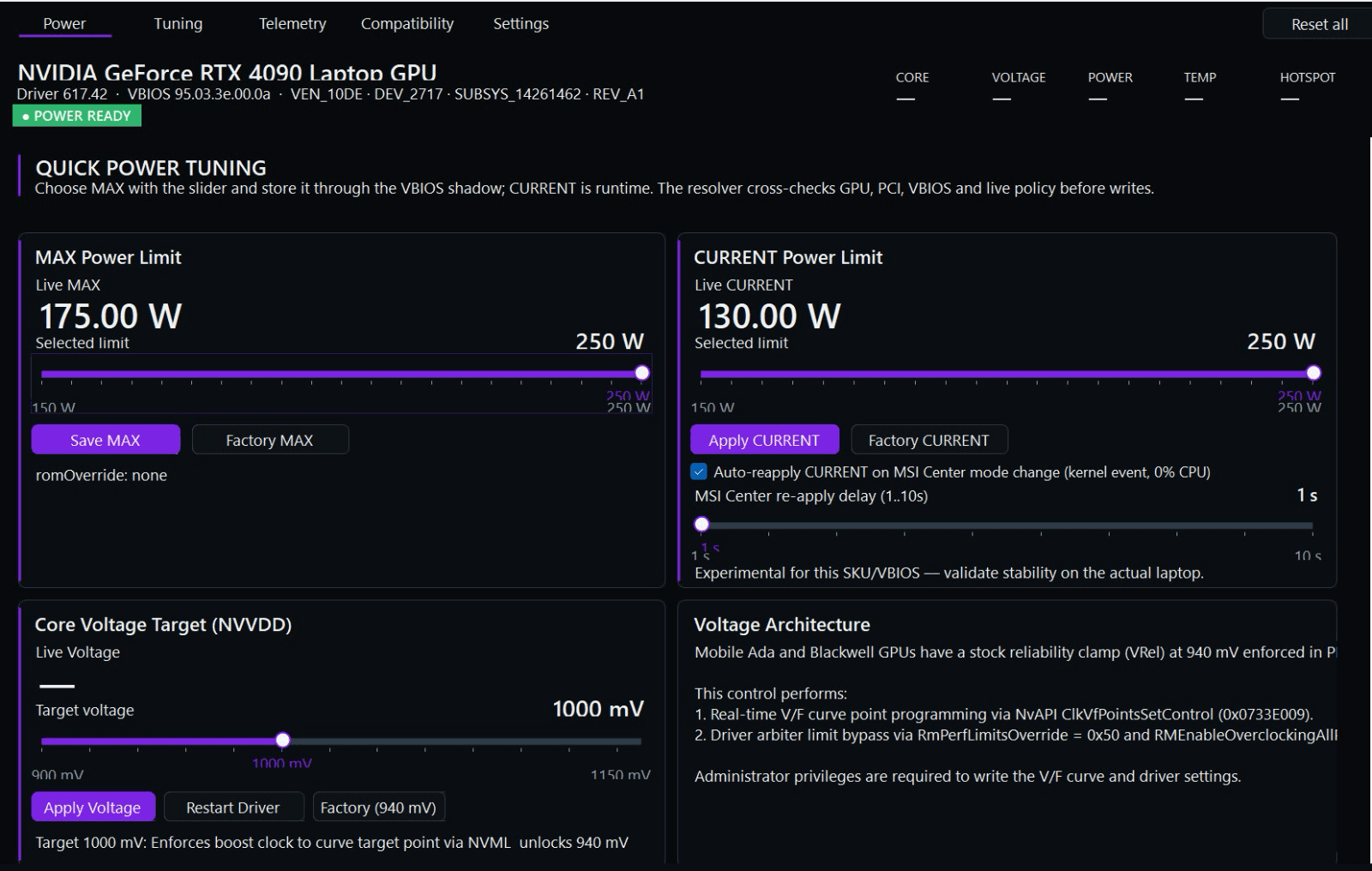
NVIDIA caps RTX laptop GPUs at 175 W or less in firmware, whatever cooling your laptop has. NvpwrControl raises that limit as high as 250 W. In 3DMark it has meant around 30% more GPU performance.
- Readout
- RTX 4090 Laptop
- Power limit, stock
- 175 W
- Power limit, unlocked
- 250 W
- Time Spy graphics, stock avg.
- 21,007
- Time Spy graphics, unlocked
- 25,564
- Change
- +22%
01
The cap
Same chip as a desktop card. Half the power.
Flagship laptop GPUs are built on the same dies as desktop cards. The RTX 4090 Laptop uses the AD103 chip from the desktop RTX 4080, which is rated for 320 W. In a laptop, NVIDIA’s firmware caps it at 175 W, and laptop makers can only configure it lower.
The cap is the same in a thin 14-inch laptop and an 18-inch machine built to cool far more. If your cooling has headroom, the chip can use more power than the cap allows.
Table 1 — Rated power, desktop card vs. laptop version of the same die
| Laptop GPU | Desktop card and laptop cap |
|---|---|
| RTX 5090 LaptopGB203 · same die as RTX 5080 | 360 W 175 W |
| RTX 4090 LaptopAD103 · same die as RTX 4080 | 320 W 175 W |
| RTX 5080 LaptopGB203 · same die as RTX 5070 Ti | 300 W 175 W |
| RTX 5070 Ti LaptopGB205 · same die as RTX 5070 | 250 W 140 W |
Desktop figures are NVIDIA’s reference total graphics power. Laptop figures are the maximum TGP including Dynamic Boost. Laptop variants may have slightly fewer cores enabled than their desktop counterparts.
02
Results
+21% to +54% in 3DMark.
Valid 3DMark runs from unlocked laptops, compared with the average stock result for the same GPU.
Table 2 — Graphics score, stock laptops vs. unlocked
RTX 4090 Laptop
3DMark Time Spy · Graphics score
Overall score 24,267 vs. 3DMark's 20,850 average for the same hardware.
21,00725,564+22%vs. stock average
RTX 5070 Ti Laptop
3DMark Time Spy · Graphics score
Overall score 18,754 vs. 3DMark's 15,866 average for the same hardware.
17,22520,858+21%vs. stock median
RTX 5090 Laptop
3DMark Steel Nomad · Score
Above the best stock result on record (6,329).
5,8999,072+54%vs. stock average
RTX 5080 Laptop
3DMark Steel Nomad · Score
Above the best stock result on record (5,545).
4,8547,338+51%vs. stock average
Fig. 2a — RTX 4090 Laptop, 3DMark Time Spy, 25,564. Click to enlarge.
Fig. 2b — RTX 5070 Ti Laptop, 3DMark Time Spy, 20,858. Click to enlarge.
Fig. 2c — RTX 5090 Laptop, 3DMark Steel Nomad, 9,072. Click to enlarge.
Fig. 2d — RTX 5080 Laptop, 3DMark Steel Nomad, 7,338. Click to enlarge.
Method. Stock references are averages from Notebookcheck’s benchmark database for each laptop GPU (median for the RTX 5070 Ti Laptop). They cover stock laptops at a range of OEM power settings. Unlocked results include the clock offsets available in NvpwrControl. Your gains depend on your laptop’s cooling, power adapter and silicon.
03
Procedure
Three steps, checked before every write.
NvpwrControl works with the NVIDIA driver directly to change a limit that tools like MSI Afterburner can’t reach. Afterburner can shift clocks, but it can’t raise a laptop GPU’s power ceiling.
- 1
Identify
The app checks your GPU, PCI IDs, NVIDIA driver and VBIOS against the live power policy before anything is written. If something doesn't match, power changes stay locked.
- 2
Set MAX
Choose a new maximum power limit, save it and reboot. The app backs up the NVIDIA driver settings first, and never flashes your GPU's VBIOS.
- 3
Apply CURRENT
After the reboot, set the runtime limit while the GPU is idle. If MSI Center resets it when you switch modes, the auto-reapply option sets it again on a kernel event, using no CPU in between.
Also in the app — Everything on one screen, with live readouts.
- Power limit
- Raise the TGP ceiling in 5 W steps, beyond the limit your laptop maker set.
- Reset all
- One click returns CURRENT to stock and removes the MAX override and autostart.
- Clock offsets
- Core offset up to ±1000 MHz and memory up to ±3000 MHz through NVAPI.
- Voltage target
- Experimental V/F curve control for the NVVDD rail, for advanced users.
- Telemetry
- Clocks, voltage, power, temperature and hotspot, plus P-states and rails.
- OEM tools
- Re-applies your limit after MSI Center mode changes, with a 1–10 s delay.
04
Compatibility
RTX 50 and 40 series supported. RTX 30 and 20 series now experimental.
Windows 10 and 11 (64-bit), with administrator rights. Each supported GPU has a target range. The app validates your NVIDIA driver and VBIOS before it allows any change.
| Laptop GPU | Target range |
|---|---|
| RTX 5090 | 175–250 W |
| RTX 5080 | 175–250 W |
| RTX 5070 Ti | 140–180 W |
| RTX 5070 | 115–140 W |
| RTX 5060 | 115–140 W |
| RTX 5050 | 115–140 W |
| Laptop GPU | Target range |
|---|---|
| RTX 4090 | 150–250 W |
| RTX 4080 | 150–225 W |
| RTX 4070 | 120–150 W |
| RTX 4060 | 120–150 W |
| RTX 4050 | 115–140 W |
New — experimental support
- RTX 30Ampere laptop GPUsExperimental
- RTX 20Turing laptop GPUsExperimental
Older laptops can now be unlocked too. Experimental means limits aren’t yet validated for every model, so raise the limit in small steps and check stability on your own laptop.
05
Notes
Read before you unlock.
Do I need a bigger power adapter?
Possibly. The GPU draws more at higher limits, so your adapter needs enough wattage for the GPU and CPU together. If it can’t keep up, the laptop will throttle or drain the battery while plugged in.
Can I undo it?
Yes. Reset all returns CURRENT to stock and removes the MAX override and autostart; reboot if it asks. The app backs up the NVIDIA driver settings before changing MAX, and never flashes the GPU’s VBIOS chip.
Do I need to install anything?
No. It’s portable: extract the zip to a normal folder and run NvpwrControl.exe as administrator. Windows SmartScreen may warn because the app isn’t code-signed; choose More info, then Run anyway. The README in the download walks through the first run.
Why can't I just use MSI Afterburner?
Afterburner and similar tools adjust clock and memory offsets within the limits the driver allows. On laptops the power ceiling is locked, so they can’t raise it. NvpwrControl changes the limit itself.
What does experimental support for RTX 20 and 30 series mean?
The unlock works on those generations, but target ranges haven’t been validated across every model yet. Start close to your stock limit, raise it in small steps and test stability on your own laptop.
Is it a subscription?
No. It’s a one-time payment for a lifetime license, and every future update is included. You download new versions from your account.
Will it void my warranty?
That depends on your laptop maker. NvpwrControl is software and can be reverted, but running hardware beyond its stock configuration may affect warranty claims.
Is this made by NVIDIA?
No. NvpwrControl is independent and isn’t affiliated with, sponsored by or endorsed by NVIDIA or any laptop maker.
06
License
One payment. Every update after it.
NvpwrControl · lifetime license
—
Price shown at checkout
- License
- Lifetime, for one person. No subscription.
- Updates
- Every future version, including new GPU and driver support.
- GPUs
- RTX 50 and 40 series, plus experimental RTX 30 and 20 series.
- Delivery
- Download from your account right after payment, any time after.
Checkout is handled by Stripe. You sign in with your email first, so your license and downloads stay linked to your account.
End of datasheet